

AI agents are software that works through a task in several steps, using a language model, company data, and tools, within limits that people set. In an enterprise they do at least six kinds of work: they answer, draft, check, classify, monitor, and act. This guide explains each job, what it needs before a regulated company relies on it, and where to see one at work.
In many organizations, agents are already being relied on to support employees in their everyday tasks. A procurement analyst might, for example, ask her company's AI assistant how much notice a supplier has to give before ending a contract. The assistant finds the clause, quotes it, and points to the relevant page of the master agreement. It takes about two seconds.
Next, she might ask it to send the supplier a termination letter.
Now, that's a very different job. Running a search to deliver a sourced answer only requires read access to the contracts she is allowed to open. Drafting a letter and sending it, on the other hand, actually acts on the company's behalf. For that, it needs to know who is allowed to end a contract, whether legal signs off first, and which system the letter goes out from. A wrong answer to the first question costs her a minute of checking. A wrong answer to the second can cost the company a supplier.
In this scenario, both requests went to the same assistant, yet they are different jobs with different risks. Much of the confusion around enterprise AI agents starts with treating them as one thing.
What an AI Agent Is, and What It Isn't
An AI agent uses a language model to work toward a goal across multiple steps, drawing on tools and company data. While a chatbot answers a question and a copilot helps one person inside one application, an agent decides what to do next and can act in other systems, usually within rules set in advance and with a person able to step in.
Systems like these are often called agentic AI. Enterprise AI agents apply the idea within a company's own systems, which raises three practical questions: whose permissions the agent works under, who approves what it does, and what record it leaves.
Types of AI Agents by Decision Logic
Search for "types of AI agents" and you'll find that most of the top results sort them by how they decide. The usual list runs like this:
- Simple reflex agents respond to the current input with fixed rules.
- Model-based agents keep an internal picture of their surroundings and update it as things change.
- Goal-based agents choose the actions that move them toward a goal.
- Utility-based agents weigh options by how good each outcome would be.
- Learning agents improve their behavior from feedback.
- Multi-agent systems split a task across several agents that coordinate.
That list helps the engineers who build agents. It tells a business leader little about where to start, because it says nothing about the work the agent does or the risk that work carries.
AI Agent Use Cases, Sorted by Job
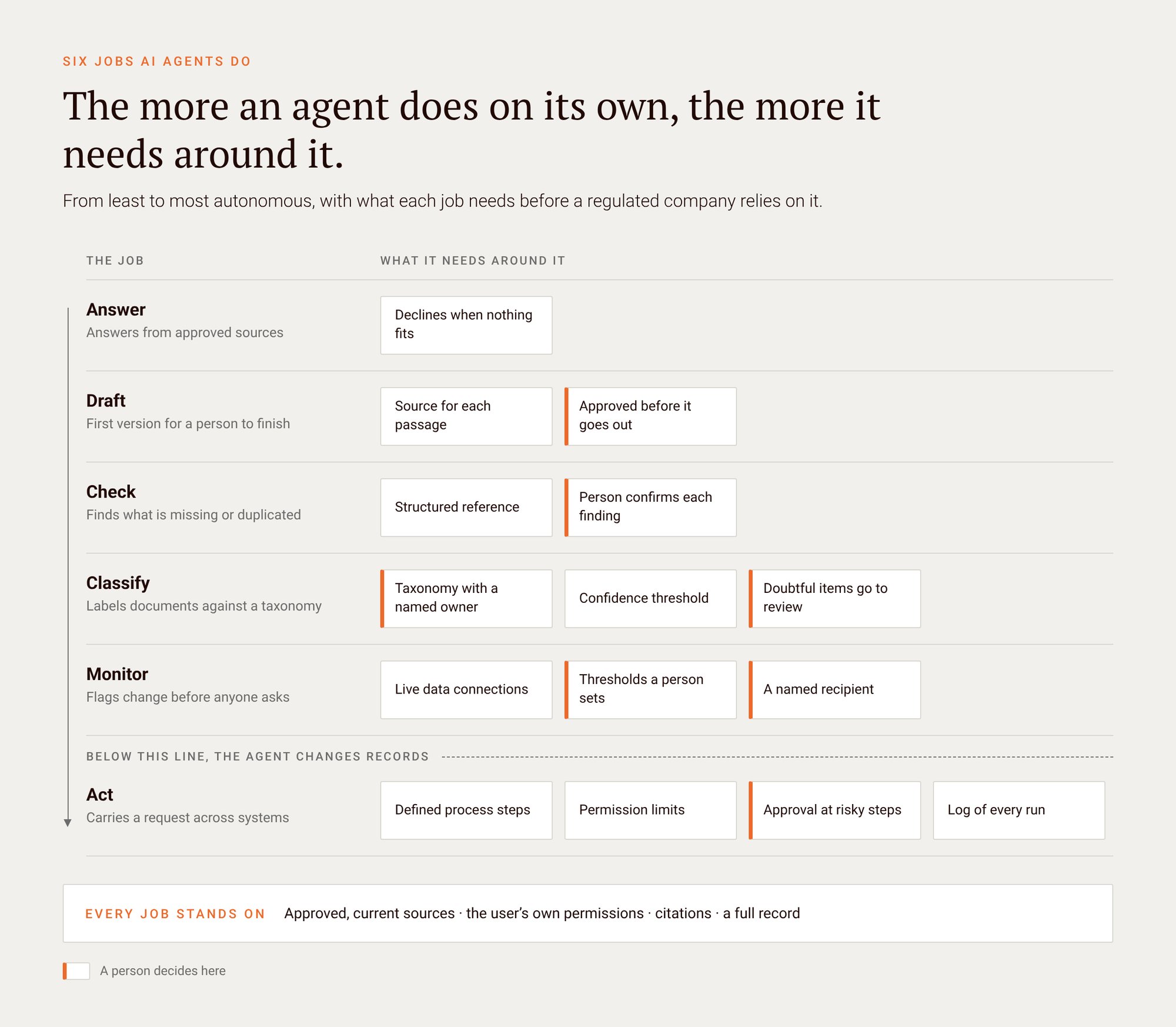
This article sorts AI agent use cases by job instead. The six run roughly from least to most autonomous.
| Job | What the agent does | What it needs around it | See one at work |
|---|---|---|---|
| Answer | Answers questions from approved sources and cites them | Access control that follows the user, citations, content someone keeps current | |
| Draft | Builds a first version from past approved material for a person to review | A source for each passage, a review step before anything goes out | |
| Check | Compares work against a reference to find what is missing, duplicated, or unbilled | A structured reference such as a taxonomy or contract data, results traceable to the source | |
| Classify | Labels incoming documents against a taxonomy and sends doubtful ones to a person | A taxonomy, a review queue, an audit trail | |
| Monitor | Watches sources and flags changes or risk before anyone asks | Live data connections, clear thresholds, a named recipient | |
| Act | Carries a request across systems to completion, such as an email into a quote | Permission limits, defined process steps, approvals, an audit log |
Answer: Questions Settled From Approved Sources
An answer agent responds to a question using only the sources a company has approved. It shows which passage it used and respects what the person asking is allowed to see. It takes no action anywhere: its output is a cited answer that a person reads and decides on.
It's probably the job most people meet first. Somebody has a question about a VPN setting, a leave policy, or an expense limit, and walks over to the colleague who always knows. An answer agent plays that colleague and also points to the runbook or policy page it used. The IT helpdesk demo does this for VPN, password, and device questions. The expense and budget policy demo adds the approval route to the answer, and the regulatory document search demo cites answers across regulations and maps them to the policies they affect.
For the answers to be trusted, the agent retrieves from content the company has approved, so a stale or unofficial document does not slip in. It retrieves under the asking user's own permissions, so an employee never sees a page they could not open themselves. And every answer carries its citation, which lets a person check it in seconds instead of taking it on faith. When nothing in the approved sources covers the question, the right behavior is to say so.
Obviously, ensuring accurate outputs comes with some maintenance: somebody has to own the runbooks and policies the agent reads, because an agent that reads an out-of-date page will deliver out-of-date answers.
Draft: A First Version for a Person to Finish
A draft agent puts together a first version of a document from material the company has already approved, such as past bids, deal files, or study reports, and hands it to a person to review. The person decides what goes out. The value is that people start from a cited draft instead of a blank page.
The clearest example is the RFP. A bid team gets a tender with a long list of questions, many of which the company has answered before in some earlier bid. The RFP response demo first extracts the requirements from the tender, then drafts answers from past winning responses. The same pattern shows up elsewhere: the deal research demo drafts investment committee memo sections with citations, and the pre-clinical regulatory demo drafts study documents cited to source.
A draft agent differs from a text generator in what surrounds the draft. Each passage should be traceable to the document it came from, so a reviewer can check a claim against its source instead of rereading the whole file. And a review step sits between the draft and anything that leaves the building. Nobody sends the draft; a person approves it, and the agent's job ends there.
As in the previous case, a draft is only as good as the library behind it. A draft built from last year's answer to a question whose facts have since changed will read well and be wrong. For a closer look at how teams keep that library governed, see proposal automation starts with the answers you already have, and for the security-questionnaire version, security questionnaire automation that wins bids.
Check: Finding What Is Missing, Duplicated, or Unbilled
A check agent compares one body of work against a reference and reports what does not line up: a requirement with no matching policy, an experiment someone already ran, a contract clause that was never billed. It finds gaps and duplicates that keyword search misses, because a gap has nothing to match.
Search returns documents that contain your words. A missing policy contains nothing, so search has nothing to return, which is the argument in why compliance gap analysis is so slow. A check agent works the other way around: it starts from the reference, say a regulation or a contract, and asks what the rest of the files say about each item in it.
Two demos show the range. The R&D deduplication demo checks a planned experiment against existing records before the work starts, so a lab does not repeat something a colleague already finished. The contract demo looks for index-linked revenue that was never billed and traces each finding to the invoice.
What it needs is a reference that is structured enough to compare against. Where a company already has a taxonomy or a knowledge graph, the agent can compare against defined concepts and relationships, which sharpens the result. Where it does not, the agent can still compare against the documents themselves. Either way, each finding should link to the clause, record, or invoice behind it, and a person should confirm it before anyone writes to a customer about unbilled revenue.
Classify: Sorting Documents Before Anyone Has To
A classification agent reads incoming documents, labels them against the company's own taxonomy, and sends the ones it is unsure about to a person. It does the sorting that would otherwise happen late, by hand, or never, so search, access control, and retention rules work from labels that actually exist.
Most organizations know what happens without it: shared drives full of files nobody has sorted, and several versions of the same policy with no clear sign of which one is current. Classification is unglamorous work, and everything downstream depends on it. An answer agent that cannot tell a draft policy from an approved one will cite both.
The document classification demo shows the pattern: documents are classified at ingestion against a taxonomy, and anything the agent is unsure about lands in a review queue. The business supplies the taxonomy, with the categories and terms people in the organization actually use, and the agent applies them.
The taxonomy needs an owner who can change it. A confidence threshold decides what the agent labels on its own and what a person sees first. And every label change is logged, so a compliance officer can see who or what applied a label, and when. In our experience, building a good taxonomy takes most of the effort. The guide to data classification for enterprise AI covers how to approach it.
Monitor: Telling the Right Person Before They Ask
A monitor agent keeps watching sources such as portfolio company reports, regulatory guidance, or market data, and tells a named person when something crosses a threshold they care about. It replaces the periodic manual review with a standing one. It only raises the flag; what to do about it stays with a person.
The old version of this job is the weekly report that somebody assembles by hand and most people skim. The portfolio insight demo shows a risk view across portfolio companies, built to be ready before the board pack is due. The pre-clinical regulatory demo watches for new guidance and searches patents, with its findings cited to source.
It needs live connections to the systems it watches, because a risk view built on last month's export is already out of date. It needs thresholds that a person chose and can change. It needs a named recipient, since an alert addressed to "the team" tends to be read by nobody. And it needs a record of what was flagged and why, so the next review can ask whether the thresholds were right.
The tuning takes real effort. If the threshold is too low, people learn to ignore the messages, and the agent ends up as one more report nobody reads. Agents that run on a schedule also raise their own questions about what they are allowed to do unattended, which the post on scheduled AI agents works through.
Act: Carrying the Request Through to the End
An act agent carries a request through several systems until it is done, such as turning a spare-part email into a quotation in the ERP. It moves from reading to writing, so it needs the most around it: limits on what it can touch, process steps it cannot skip, approvals at the risky steps, and a log of every move.
The email-to-quotation demo is a good illustration. A customer emails a request for spare parts, and the agent drafts an SAP quotation, scored at each step, which an engineer approves before it goes out. Nothing about the individual steps is exotic. The change is that one agent works through the whole chain instead of passing it from person to person.
This is also the job where mistakes get expensive fastest. A wrong answer is read and checked. A wrong action changes a record, sends a message, or commits the company to a price, and somebody then has to undo it. So the structure around an act agent should be explicit. The business process is modeled in advance, for example as a BPMN process model, so the agent follows defined states and cannot skip an approval because a shortcut looked efficient. Its permissions are set by the administrators who own the systems it touches. And every run is recorded, including the runs a person took over.
Where people stay in the loop: an act agent should hand over to a person wherever an action is hard to reverse, leaves the company, or falls outside what it was set up to do. The person sees what the agent did, why, and what it proposes next.
The post on human oversight for AI agents walks through one such handover in a supply chain, and human in the loop AI agent approval covers when an approval should fire and what the approver should see.
What Every Agent Needs Around It
Whatever the job, an agent is only as trustworthy as the system around it: the data it can reach, the permissions it works under, the rules it follows, and the record it leaves. Those four stay the same from an answer agent to an act agent. What changes is how tight each one has to be.
- The data it can reach. The agent retrieves from approved, current sources and cites what it used. This holds for every job above.
- The permissions it works under. The agent sees what the person it works for is allowed to see, and touches only the systems its administrators have opened to it.
- The rules it follows. For jobs that change things, the process lives outside the language model, in defined steps and approvals the model cannot rewrite. The architecture behind this is the subject of agentic AI architecture: the missing layer for scaling AI agents.
- The record it leaves. Every retrieval, decision, and action is logged so that an auditor can reconstruct what happened. Coordinating all of these parts across an enterprise platform is the topic of enterprise AI orchestration explained, and the governance side is covered in AI agent governance and auditability.
A knowledge layer, meaning a taxonomy, ontology, or knowledge graph, makes several of these jobs sharper, particularly checking and classifying. It helps where a company has one, and no job above requires it. The baseline is grounded retrieval over approved content, which every job above stands on.
Not every task needs an agent. If a question has one correct answer in a database, a query does it faster and cheaper. If the steps never vary, ordinary workflow software does it without a model at all. If a task never needs judgment, it does not need an agent. Agents earn their place where the input is messy, the sources are documents, and someone has to weigh what they say.
Questions to Ask Any AI Agent Platform
The four needs above turn into questions you can put to any vendor during a demo. A good answer comes with something you can see on screen.
- Whose permissions does the agent use? It should see only what the person it works for can open, checked on every query. More on fine-grained access control for AI.
- Can every answer be traced to a source passage? A reviewer should reach the exact clause in one click. More on AI grounding as infrastructure.
- Where does the business process live? For agents that act, the steps and approvals should sit in a process model the language model cannot rewrite. More on AI agents and BPMN process models.
- Who decides where approvals fire, and what does the approver see? The answer should name a role and show the approval screen. More on human in the loop AI agent approval.
- What gets logged, and can an auditor read it? Every retrieval, decision, action, and override should be recorded. More on AI agent governance and auditability.
- Can it use your own taxonomy or knowledge graph? Where you have one, it should sharpen results; where you do not, the agent should still work. More on knowledge graphs for enterprise AI.
- Where does it run? Cloud, private cloud, on-premises, or fully offline, depending on where your data has to stay. More on deployment options from VPC to air-gapped.
Where to Start
Start with one job, one team, and one workflow where the sources already exist and a person can review the output. Answer and Draft are often the easier first picks, because the risk is low and they build the library of approved content that the later jobs depend on. Starting small has a second benefit: the next agent can reuse what the first one set up, such as connections to source systems, a permission model, and a shared vocabulary of terms.
The numbers say most companies are still working this out. In its August 2026 survey, McKinsey found that 40 percent of respondents from large organizations (revenue above $1 billion) were scaling AI agents in at least one function, up from 27 percent a year earlier, while the share at smaller organizations stayed flat at 22 percent. Deloitte's Tech Trends 2026, drawing on a mid-2025 survey of 500 US technology leaders, reports that 11 percent of organizations have agents in production, although 38 percent are piloting them. The two surveys define "scaling" and "production" differently, so read them as direction rather than as one measurement: more large companies are moving agents into regular use, and many others are still in pilots.
If you are choosing a first project, four questions help:
- Which recurring task on your team involves reading documents and making a judgment?
- Which of the six jobs does that task most resemble?
- Where do the approved sources live, and who keeps them current?
- Who reviews the output, and what happens when they disagree with the agent?
If the answers come quickly, you have a candidate. If they do not, that is useful to know before anything gets built. For the pattern behind projects that stall after a promising pilot, see why agentic AI projects fail and how to avoid it.
Seeing These Jobs at Work
Every demo linked above sits in the Demo Center, where guided tours and interactive demos open in the browser. They are prototypes on sample data. A real deployment runs on your own content and does more than a demo can show.
At Squirro, we build agents for these jobs around the four needs described above: approved data, the user's own permissions, defined rules, and a full record. The Agent Catalog collects the agents built so far, and the agentic AI platform page explains how they are run and governed. For the longer argument on why buyers should weigh the cost of the second use case and not only the first, see Escaping Pilot Purgatory: An Enterprise AI Strategy That Compounds. Strictly speaking, you could build any of these yourself. The question is who looks after the plumbing in year two.